Bring back essay assignments with whole-process pedagogy
MATCHA’s whole-process assessment method makes essay assignments fair again while removing the need to
police AI misuse.
It’s simple: use MATCHA’s
Process History feature to track all
reading, note-taking, and editing done by your students. MATCHA will give you easy-to-understand
statistics and graphics allowing you to assign marks to reward and encourage a good work process. It’s
better pedagogy, and it makes AI misuse impractical.
As an extra precaution and an opportunity for students to deepen their reflection, MATCHA also facilitates
in-person follow-up quizzes.
The instructor creates an activity on the
Instructor Dashboard, enabling Complete Work History. Optionally, they prepare a follow-up quiz using general questions
as well as AI prompts for student-specific questions.
How students join
Students install MATCHA on their computers and start the activity using the access code provided
by their instructor (or a link on the course website if LTI is enabled).
Students do all their reading, note-taking, and writing in MATCHA, which records all their work.
They use it much like a regular word processor and browser.
Submitting the work
Students submit their work using the in-app submission tool.
The instructor or an assistant grades essays using MATCHA’s integrated grading tool. Students are
assessed on their reading and composition process, not just the resulting essay.
Investigating possible plagiarism
If necessary, MATCHA provides extensive information to support investigation into possible
plagiarism. It uses an automated classifier to flag possible cases of AI transcription. It reports
metrics such as
character churn,
writing time,
reading time, and
time fragmentation, which can draw attention to possible plagiarism. MATCHA primarily aims to prevent and deter
plagiarism, but it also gives instructors powerful tools to detect it when it happens.
complete work history
in-person follow-up quiz= real work
Key features for essay assignments at home
MATCHA / Complete Work History
Complete Work History
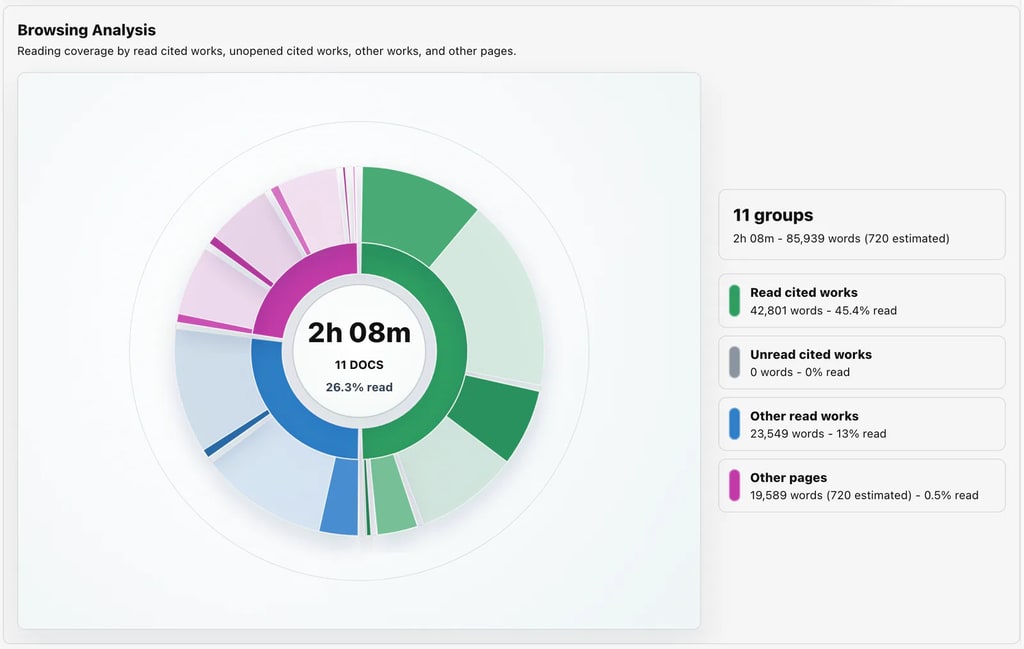
Activities can be configured to record all work done within the built-in browser, note tool, and
editor. MATCHA will provide graphical and numerical summaries while allowing you to replay the work
process. You will know how much of each reference cited was read and exactly how much editing was
done. This allows you to reward effort and process, not just the output, which both helps students
learn good methods and makes AI cheating harder.
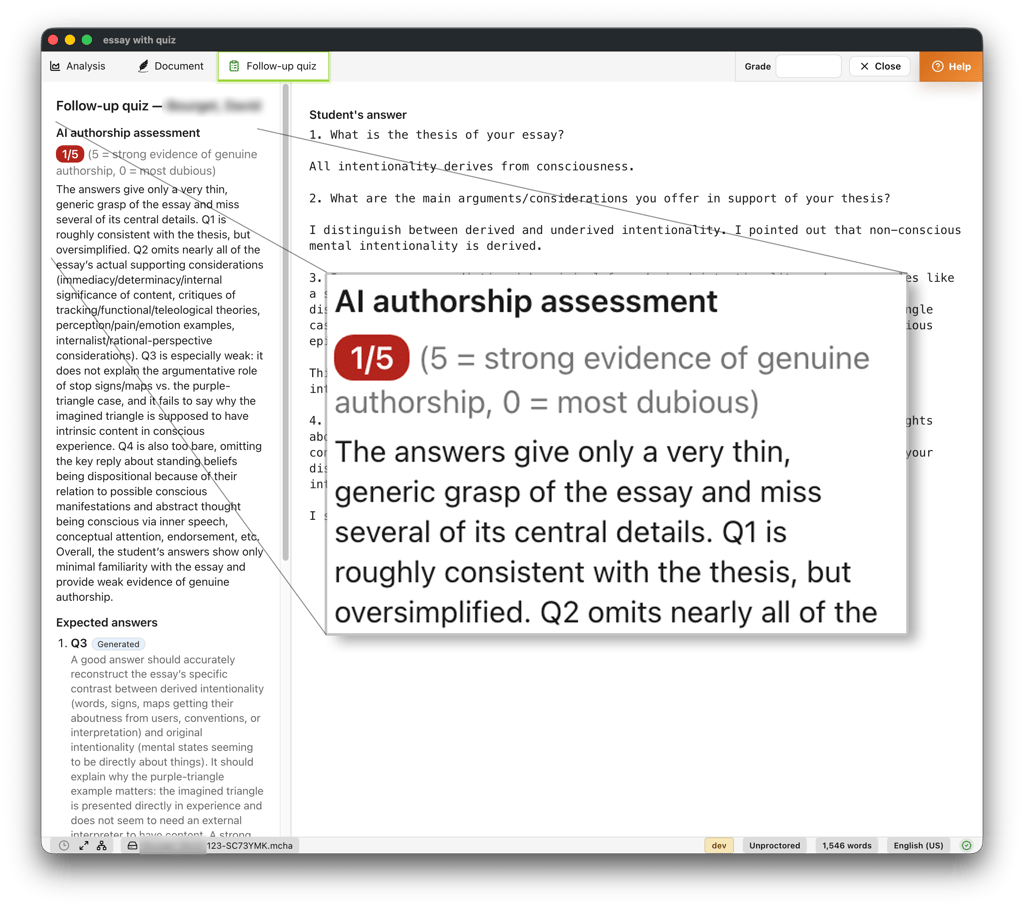
Generate instructor-managed, AI-assisted follow-up quizzes based on each student's essay and work
history. Used in person, these quizzes help verify authorship for unsupervised assignments while
giving students an opportunity to deepen their reflection with feedback.
Detect automated writing and browsing in MATCHA. Automated text entry is rolled back, while automated
browsing is marked in the history and excluded from reading statistics.
MATCHA's instructor-configured AI assistant helps reduce the temptation of AI misuse by providing help
that is consistent with typical learning objectives.
“[...] I've been extremely happy with it so far. So many more of my students' essays look like (and
presumably are) actual student essays again. [..] I’m a huge fan.”
Kyle YorkUniversity of Colorado Boulder
“I asked and incentivized my students to use MATCHA for at-home essays; the result was that AI
misuse was almost completely eliminated and what remained became easy to catch.”
Eric WilkinsonUniversity of British Columbia
“I find several features of MATCHA that are meant to be for authentication purposes to be very
useful for pedagogical purposes. [...] it gives me a quick overview of how my students write so that
I can go into further detail with them.”
David Miguel GrayUniversity of Memphis
“Cheating in the MATCHA era? Good luck with that!”
Anthony SkeltonWestern University
How MATCHA compares
with other edit-tracking software when used at home (for example, Turnitin Clarity or Draftback)
Other edit-tracking software does not record all browsing and reading, which is key to an
AI-resistant pedagogy while also providing richer data to support plagiarism investigations as
needed.
Follow-Up Quizzes
Other edit-tracking software does not generate authorship quizzes or provide a secure environment to
take these quizzes.
Automation Blocking
Other edit-tracking editors run in the browser, which means they can easily be circumvented using
browser plugins, auto-typers, and AI agents that can control the browser (now available from major
AI vendors such as Anthropic and OpenAI). Only a standalone app with OS-native functionality can
defend against these widespread, off-the-shelf cheating methods.
Before they begin, the Activity Summary explains what information is collected and who can access it.
Collection depends on the features you enable. MATCHA’s proctoring does not collect camera footage,
microphone data, or screenshots.
MATCHA institutional licenses are usually available for a fraction of the cost of Turnitin + AI
Detection + LockedDown Browser (without video monitoring). Your savings will depend on your particular
contracts and deployment needs. This illustration is not a quote or guarantee.
Other uses
MATCHA’s authorship certification features have many other uses.